DLReel logo
History
ReelsPhotosFB ReelsStoriesFix URLs
Fix Instagram URLs

Download Instagram Photos & Images Easily!

Save Instagram photos in original quality with our free downloader.
Placeholder thumbnail

Instagram Photo & Carousel Downloader — Save Images in HD

Easily download Instagram photos, single-image posts, and multi-image carousels with DLReel. No account needed and no watermarks — just paste the Instagram post link and get the original image files in high quality. Works on mobile and desktop browsers.
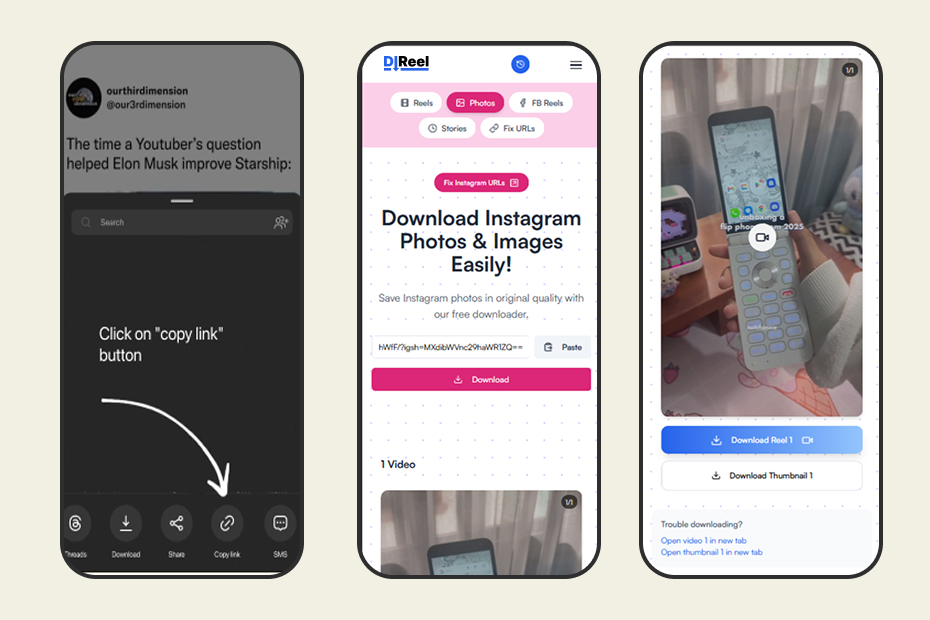
Benefits of using DLReel for Instagram images

  • High-quality downloads — preserve original image resolution (where available).
  • No login required — download public Instagram content without signing in.
  • Download carousels — save each image from multi-photo posts individually.
  • Fast & secure — instant processing in the browser, we don’t keep files longer than necessary.
  • Free & online — no installation, works across devices and platforms.

How to download Instagram photos and carousels (3 steps)

  1. Copy the Instagram post link: In the Instagram app or on the web, tap the share icon and select "Copy Link" for the post.
  2. Paste it into DLReel: Open the Instagram Photo downloader, paste the link into the input box, and press "Download".
  3. Save each image: For carousels, DLReel will list downloadable images. Click each item to save the image (JPG/PNG/WebP).
Copy Instagram link step

For help and troubleshooting, visit our Help center or read our FAQ for details about supported formats and privacy.

Frequently Asked Questions (FAQ)