DLReel logo
History
ReelsPhotosFB ReelsStoriesFix URLs
Fix Instagram URLs

Download Instagram Stories Anonymously!

Save Instagram stories before they disappear with our free tool.
Placeholder thumbnail

Instagram Story Downloader — Save Stories Quickly & Privately

Download Instagram Stories in a few taps with DLReel. Whether you want to save a fleeting moment, keep a memory, or share a story with someone who missed it, our Story downloader lets you save public stories as MP4 or high-quality images without logging in. It' fast, free, and easy to use on both mobile and desktop.
Benefits of using DLReel for Instagram Stories

  • Save stories instantly — download videos and images without delays.
  • No login required — works with public stories and keeps the process simple.
  • High-quality outputs — preserve video clarity and image resolution where available.
  • Mobile-friendly — optimized for quick downloads on phones and tablets.
  • Free and browser-based — no app installation needed and no hidden fees.

How to download an Instagram Story (3 easy steps)

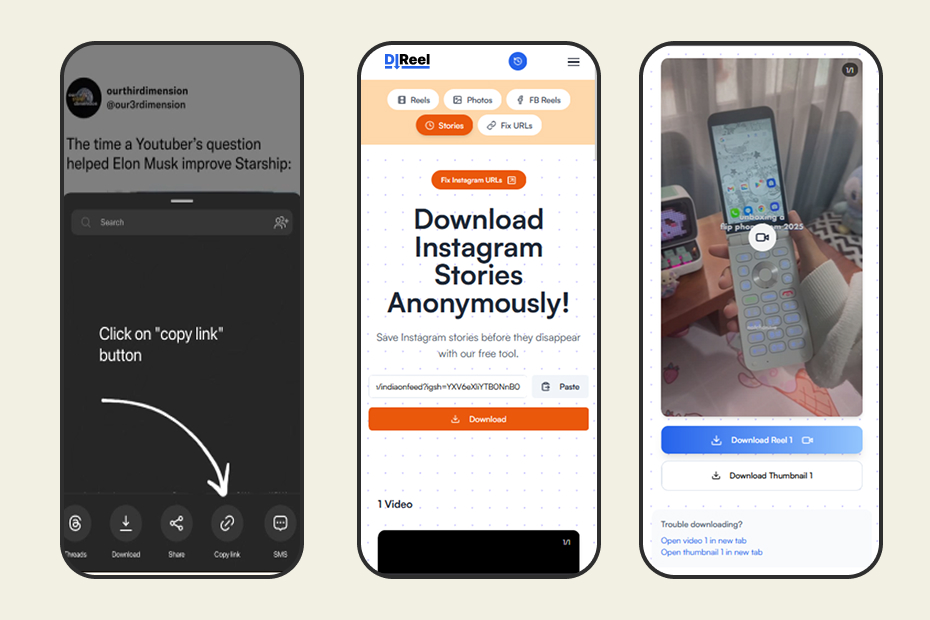
  1. Copy the story link or username: From the Instagram app, copy the story link or open the profile and copy the story URL. If the story is in a collection, copy the specific story link.
  2. Paste the link into DLReel: Enter the copied URL in the Story downloader input and click the "Download" button.
  3. Save the file: Choose the available format (MP4 for video, JPG/PNG for images) and save the story to your device.
Copy Instagram story link step

Privacy and best practices

DLReel only works with publicly accessible stories. Downloading or sharing someone else' story without permission may violate their expectations or local laws. We recommend using saved stories for personal viewing, backups, or when you have explicit consent to redistribute.

Need help? Check our Help center for device-specific tips, troubleshooting steps, and FAQs about supported story formats.

Frequently Asked Questions (FAQ)