
Share Instagram Reels or videos anonymously with our tool.
Remove tracking parameters • Optimize share links • Clean URLs
When you share an Instagram Reel, the URL often carries tracking parameters that can reveal where the link was shared from. Our Instagram URL fixer removes unnecessary query parameters and returns a clean, share-ready link that preserves the media while protecting the identity of the person who originally shared it.
Tracking parameters are small bits of data appended to URLs to help platforms track clicks, campaigns, and sources. While useful for analytics, these parameters can expose where a link was posted or who shared it. Cleaning links removes that risk and produces a neat URL that points directly to the media file.
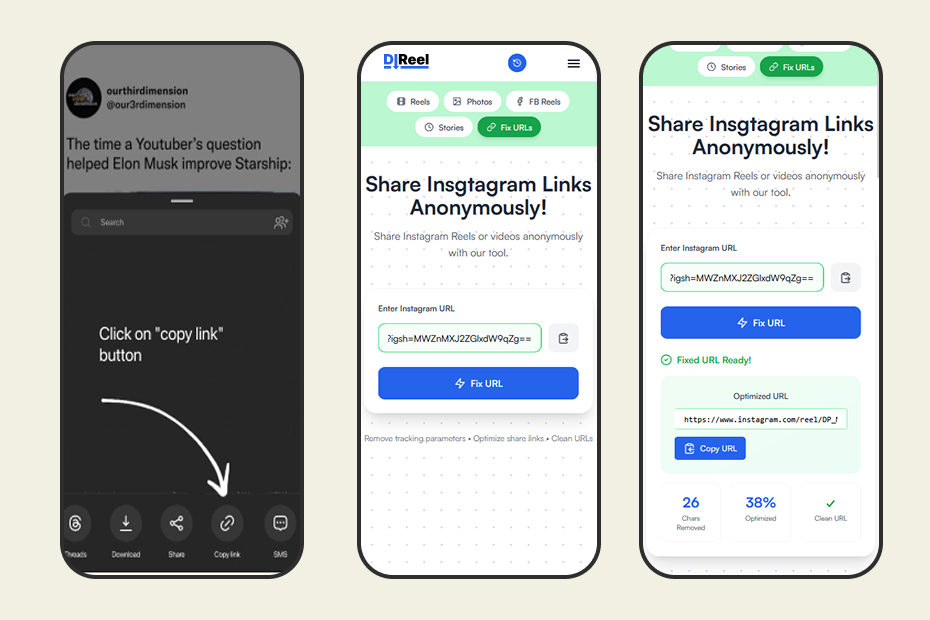
DLReel provides a link-cleaning utility for public Instagram links. Cleaning a URL does not bypass privacy settings or access controls on Instagram; it only removes visible tracking parameters. Do not use cleaned links to access private or restricted content. Always obtain permission before sharing or republishing someone else' media.
Want to learn more? Visit our Help center for tips on copying links, privacy best practices, and troubleshooting.